


Visual Impairment
Home » Learn » Inclusion Tips » Visual Impairment
What Is Visual Impairment
A visual impairment is the partial or total loss of vision or ability to see. Visual impairments come in different forms so learning the difference between them will allow you to provide the correct accommodations.
- Partially sighted: Experience some difficulty seeing or reading and can benefit from medically prescribed glasses.
- Low Vision : People with low vision still have some residual sight or be able to make out shadows. They may require assistive technology such as large text, magnifiers and may find it hard moving at certain hours without assistance, especially nighttime and evening hours. They are encouraged to learn braille as their sight could deteriorate and become totally blind
- Totally blind: inability to see at all. Individuals who are totally blind need access to braille materials, audio software, white cane and /or a sighted guide
How to refer to a person with Visual Impairment
- The blind
- Person who is blind
- Blind person (when culturally accepted)
- Person with a visual impairment
- Person with low vision (when relevant)
- Partially sighted person, Person with partial sight (when relevant)
- Person with deafblindness (when relevant)
Remember: Ask for the respectful word to refer to individuals with visual impairment in your local language since some local terms can be considered offensive. Prioritize the individual and use their names.
Most importantly, ask the person with visual impairment the terms that they prefer.
The Braille Alphabet
Braille is a system of reading and writing that is understood through touch. It is read by moving the hand or hands from left to right along each line and feeling the letters. Both hands are usually involved in the reading. It can be written using different tools such as a slate and stylus, or a Perkins Brailler. There are also newer assistive technologies that allow people to to type on a computer, and convert documents into braille through a refreshable braille display.
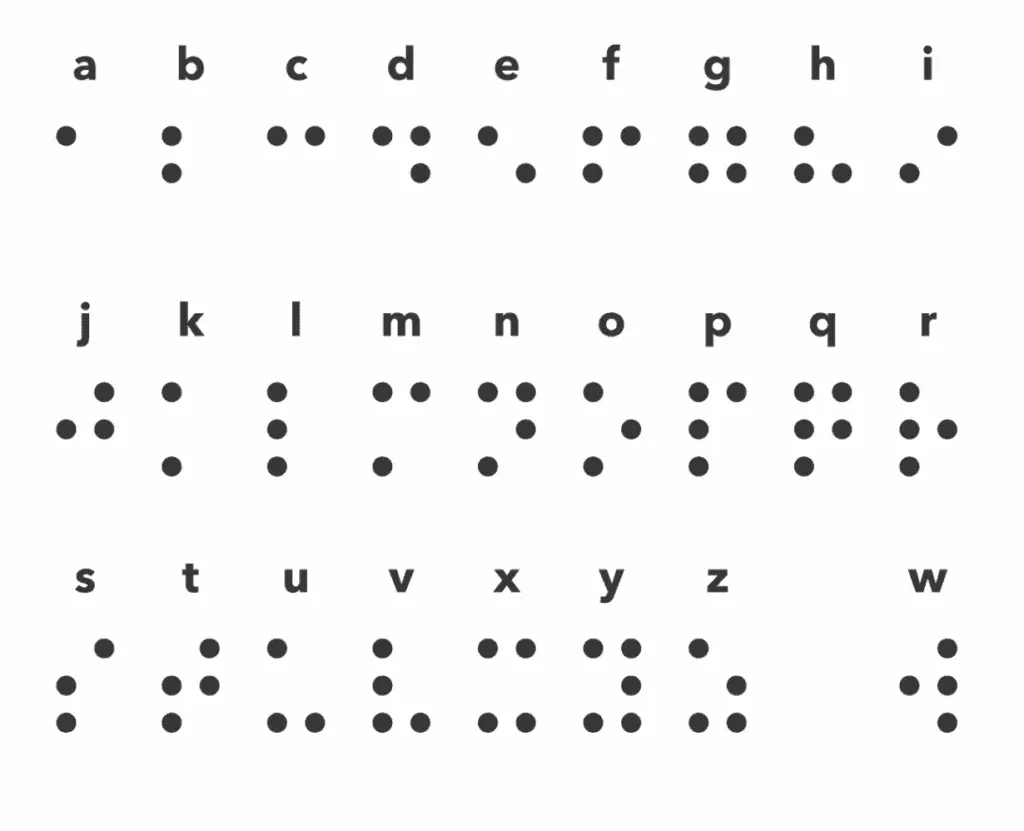
To learn more about braille, visit www.perkins.or/how-the-braille-alphabet-works
How to guide a blind person
Walk alongside and slightly ahead of them. Do not hold the person’s hand. Instead, allow them to hold yours.
Bend your arm to your back when passing through a narrow space. They will be able to get directly behind you to aviod obstacles
How to help a blind person find their seat
Put the person’s hand on the back of his/her chair. S/he will be able to sit
If the chair is backless, put his/her hand on the seat for him/her to be able to sit.
General tips on how to include people with visual impairment
- Always talk directly to the person. Do not use another person to answer your questions I.e personal assistant/family member etc.
- Identify yourself so the person with visual impairment knows who you are. Do not leave without telling him or her.
- Describe your surroundings such as the space you are in as well as any things you see to the participant with visual impairment.
- Use descriptive language instead of using words like this, the, that, there
- Read everything written on the chat / flip or power point presentation out loud
- When in groups, identify each person by name or even description so that the person with visual impairment knows who is around him/her to support networking.
- Use the person’s name when directing the conversation to him or her
- Speak naturally and clearly, there is no need to shout.
- Avoid noisy places so that they can hear you clearly
- Always ask the person with visual impairment if they need help before doing it. Do not offer help before they ask.
- Do not play with or remove a white cane of a person with visual impairment from where they place it. If it is unavoidable and you have to remove it, please remember to inform the participant where you have put it for they need it
- Inform the individual with visual impairment if you are moving away. Do not leave without telling him or her that you are leaving.
Specific tips on how to include people with visual impairment in education/training
- Include people with visual impairment in program planning to ensure their needs are met.
- Collaborate with local organizations of people with visual impairment. They will better guide on best practices.
- Take time to orient a student/participant to the classroom/training venue.
- Allow for preferential seating to allow students/trainees with low vision to see the board, and to ensure that the facilitator/lecturer can be clearly heard
- Describe any pictures, or any other visual aids shown in training, briefly describe what they are or ask another participant to do so. student/trainee with visual impairment
- When you are in a group/classroom, announce who is present so that the student with visual impairment knows who is around as this supports networking.
- Be aware of the noise levels in a venue to ensure a trainee/student with a visual impairment can hear you clearly.
- Read everything written on print material, flip chart papers/PowerPoint out loud
- For participants with low vision, use large print copies of course materials and visual aids.
- Use tactile materials to increase understanding.
- Provide soft copies of lecture notes, power points, readings, and other print based materials that can be read by a screen reader or enlarged.
- For participants who read Braille, give written information in Braille
- Allow extra time for participants to complete assignments. It takes time reading and writing in Braille
Specific tips on how to include people with visual impairment in employment
- Include colleagues with visual impairment in all cycles of program planning to ensure their needs are met
- Involve local organizations of people with visual impairment. They will know best practices on including employees with visual impairment
- Orient the employee to the buildings and other important rooms such as restrooms at the workplace. This can be done with the help of a personal assistant.
- Provide a personal assistant to the employee with visual impairment when needed
- Depending on the degree of the visual impairment, provide work material or files in large font or braille or soft copy format
- Identify each person by name or even description during meetings and at the workplace to support networking
- Keep pathways in workspaces clear from clutter, and inform the employee with visual impairment of any changes to the layout/furniture of the office in advance.
- Describe the working space you are in, as well as any things that you see so that they can paint a mental picture.